Home / Products / SiteTrack
Field-ops product

Arlabs SiteTrack

A mobile-first field-operations product for telecoms projects — house-by-house fiber installation, testing, commissioning, splicing and client-ready reporting, built for real Malaysian field conditions.

  • Mobile-first PWA — no install, works on any phone
  • Photo evidence on every entry, offline-ready capture
  • Installation, testing, splicing and reporting in one product
  • Approval-gated progress and client-ready PDF reports
PWA / mobileOffline-readyEN / BMPDF reporting
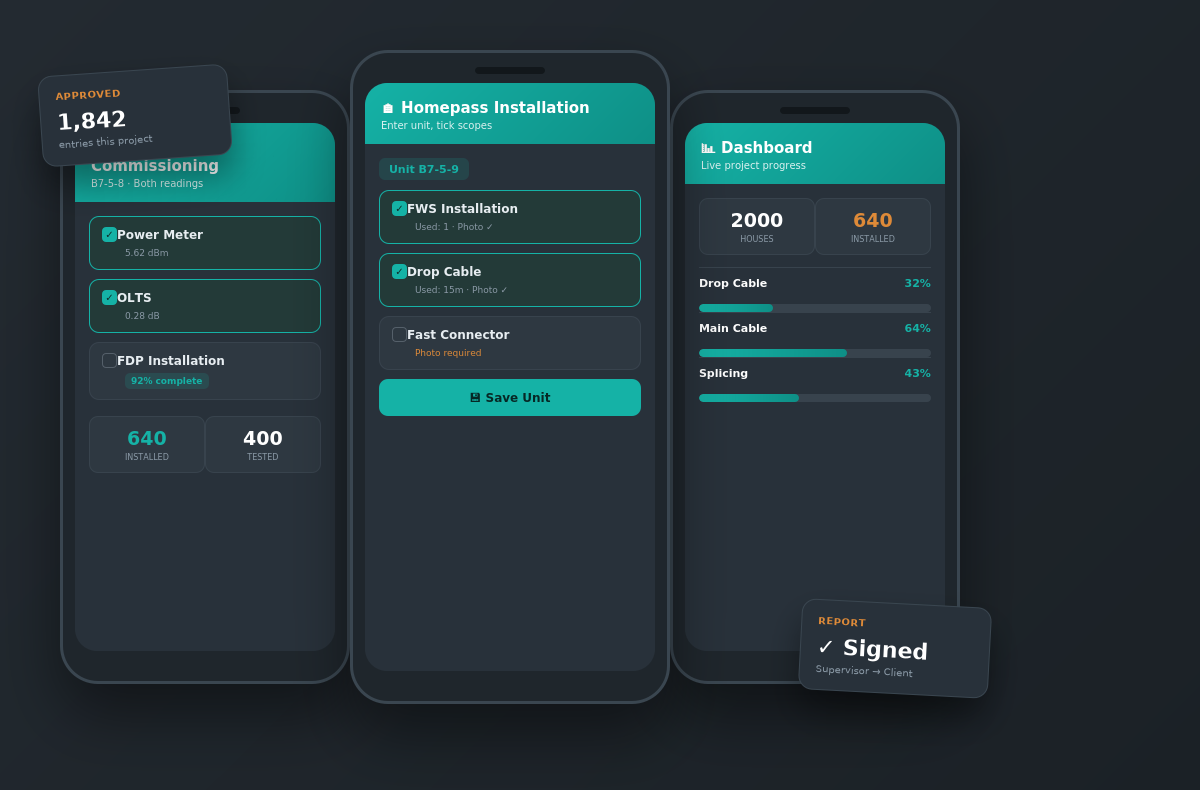
SiteTrack app — Testing & Commissioning, Homepass Installation, and Dashboard screens
In practice

A subcontractor logs a completed house in one screen with photos; a supervisor approves it; and the approved work instantly updates live project progress and the client report.

Modules

12 modules, one connected system

Each module has its own workflow and features, sharing one identity, access, notification and audit layer. Each includes a real-world use case.

Digital Field Data Collection

Capture work from the field, even offline.
  • Mobile-first PWA — no app install
  • Photo evidence on every entry (camera or gallery)
  • Automatic photo compression for weak signal
  • Offline-ready field entry
  • Digital site diary — weather, manpower, work done
  • Issue tracking from the field
Use caseA crew in a low-signal basement logs each completed unit with photos offline; entries sync automatically the moment signal returns, so nothing is lost or re-keyed.
Full details →

Homepass Installation Tracking

Track every house, block by block.
  • Scope-based tracking per Block → Level → Unit
  • One-tap full-house installation entry
  • Duplicate-entry protection
  • 'My Entries' progress dashboard for teams
  • Locked-scope safeguard against double-counting
Use caseA subcontractor logs a full house install in one screen; the system blocks a second team from logging the same unit, so progress totals stay accurate.
Full details →

Testing & Commissioning

Record test evidence per house.
  • Power Meter testing — per-house dBm with photos
  • OLTS testing — per-house loss readings
  • Dual-reading logic — 'Tested' only when both recorded
  • OTDR .sor file upload and parsing
Use caseA technician records Power Meter and OLTS readings per house with photos; the unit only turns 'Tested' once both are in, so commissioning status is never overstated.
Full details →

Splicing Management

Full core-by-core splice traceability.
  • Core-based tracking (24–288 core)
  • Standard 12-colour fiber coding with swatches
  • Per-core splice table (tube, core, destination)
  • From / To cable tracking
Use caseA splicer records each core's tube colour, core colour and destination; the full core-by-core map is available later for fault-finding and client proof.
Full details →

Approvals & Quality Control

Only verified work counts.
  • Per-entry approval workflow
  • Admin edit / delete; field teams fix own pending entries
  • Approval-gated official progress
Use caseA supervisor reviews each scope entry; only approved work counts toward official progress, while teams can still fix their own pending mistakes.
Full details →

Real-Time Dashboard

Live progress at a glance.
  • Approved vs pending (in-review) totals
  • Installed vs Tested house counts
  • 'Installed by Date' for any date range
  • Milestone tracking
Use caseA project manager opens the dashboard mid-morning and sees exactly how many houses were installed and tested today, against the total scope.
Full details →

Client-Ready Reporting

Reports your client can sign off.
  • Progress & Final report modes
  • Executive summary with completion % and charts
  • House Completion Overview matrix
  • Photo-evidence grids by block / level
  • Material usage & detailed splicing reports
Use caseBefore a client meeting, the manager generates a progress report with an executive summary, per-scope charts and photo grids — with no manual assembly.
Full details →

Digital Signing

Sign-off, built in.
  • Supervisor → Manager → Client workflow
  • Secure passcode-protected signing links (email / WhatsApp)
  • Signatures embedded in the final PDF
Use caseThe final report is signed Supervisor → Manager → Client through secure passcode links shared on WhatsApp, with signatures embedded in the PDF.
Full details →

Team Performance

See who is delivering.
  • Ranked team completion (houses, cable metres)
  • Excel export for productivity analysis
Use caseA project lead exports a ranked table of houses completed and cable metres laid per team to manage subcontractor productivity fairly.
Full details →

Built for Malaysian Field Teams

Designed for the people using it.
  • Full English & Bahasa Melayu
  • Role-based views (focused subcontractor flow)
  • Visual field guides for training (EN / BM)
Use caseA new subcontractor is onboarded in minutes using a bilingual visual guide, and works entirely in a focused two-screen flow.
Full details →

See SiteTrack in action

Book a walkthrough, read the whitepaper, or browse our other products.